
Download yvReminder – birthday reminder, contact management, agenda, personal organizer, reminder tool, mobile app
Overview
Designed as a personal organization tool, yvReminder serves as a dedicated platform for managing important dates, particularly birthdays, while extending its functionality into comprehensive contact management and agenda tracking. The app addresses the common challenge of forgetting significant personal events, such as family members’ and friends’ birthdays, by providing timely, customizable alerts. Its integration of contact data storage transforms it into a centralized digital assistant for personal and professional relationships. Users benefit from a unified space to store names, surnames, addresses, emails, and other relevant details, reducing the need to switch between multiple apps. This makes yvReminder especially valuable for individuals seeking to maintain strong interpersonal connections without the stress of manual tracking.
Target users include individuals who value relationship continuity, such as family members, close friends, and professionals managing client or colleague interactions. The app’s focus on simplicity and usability suggests it is accessible to users of all technical skill levels. Although the developer did not provide additional technical details, the app’s longevity—released in 2007—indicates a stable, enduring presence in the productivity space. Its continued availability on Android reflects a consistent user need for reliable, lightweight tools that combine reminders with contact organization. In the broader app ecosystem, yvReminder occupies a niche as a minimalist yet functional utility, offering a streamlined alternative to more complex calendar or CRM tools.
Key Features & Functionality
- Birthday Reminders: The app delivers timely notifications for upcoming birthdays, allowing users to prepare greetings or gifts in advance. This feature is particularly useful for maintaining social connections across long distances or busy schedules.
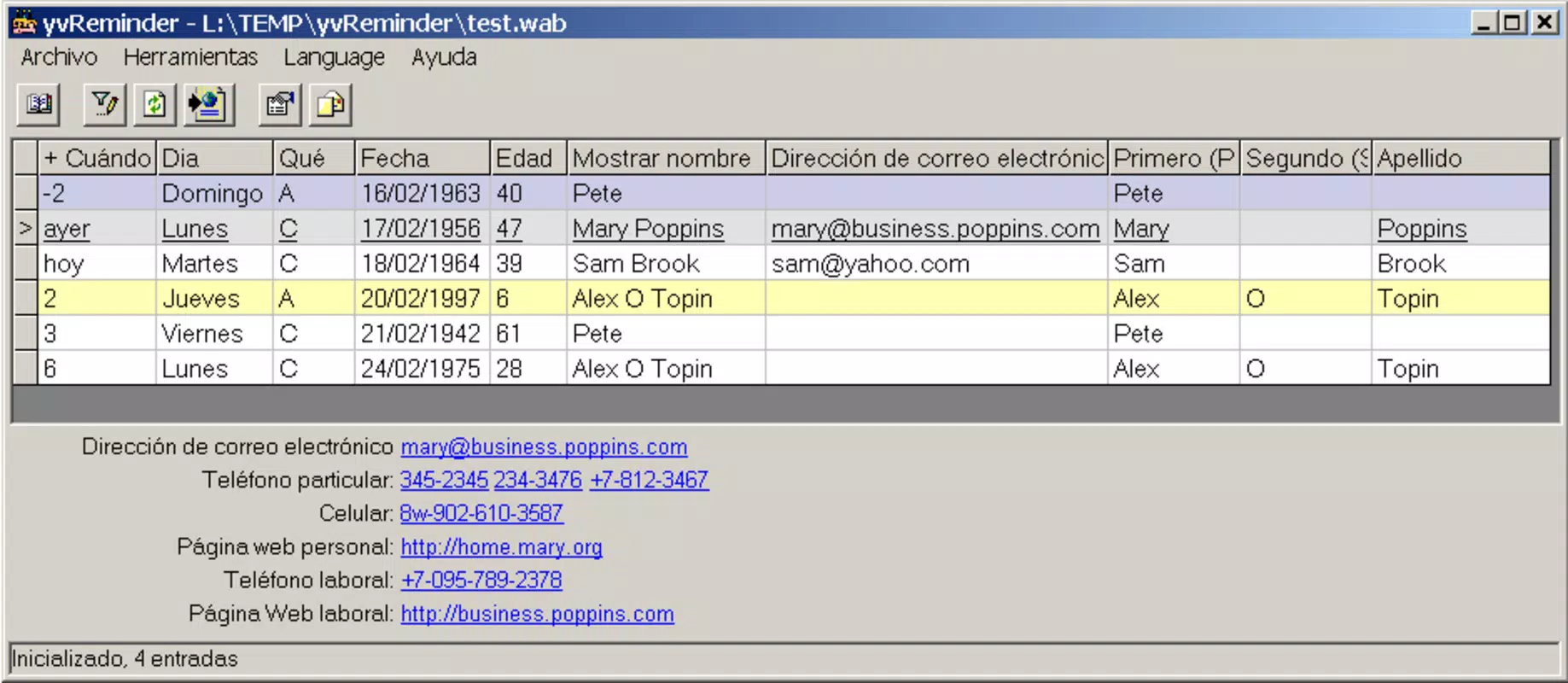
- Comprehensive Contact Management: Users can store detailed contact information, including name, surname, address, email, and other personal data. This transforms the app into a portable personal database, reducing dependency on fragmented communication tools.
- User-Friendly Interface: The clean and intuitive layout enables quick navigation and efficient data entry. New users can begin using the app immediately without requiring extensive onboarding or tutorials.
- Customizable Alerts: Users can adjust the timing of notifications—such as days or hours before an event—ensuring reminders align with personal planning preferences and routines.
- Multi-Purpose Utility: Beyond birthday tracking, yvReminder functions as a flexible agenda tool, supporting task management and daily planning. This versatility makes it suitable for both personal use and light professional organization.
For example, a user managing a large network of friends and family can set up birthday entries with custom alert settings, ensuring no occasion is missed. Similarly, a small business owner might use the app to track client contact details and follow-up dates, enhancing relationship management without the complexity of enterprise tools.
Interface, UX & Performance
yvReminder features a straightforward and uncluttered interface, prioritizing ease of access and clarity. The visual design emphasizes functionality over decorative elements, allowing users to focus on essential tasks like adding contacts or reviewing upcoming events. Navigation is intuitive, with core functions—such as viewing reminders and managing contacts—accessible through clearly labeled menus or buttons. The layout supports efficient data input, minimizing the number of steps required to complete common actions.
Although the developer did not list formal performance metrics, the app’s lightweight size of 2.3M suggests optimized resource usage, which typically translates to smooth operation on a wide range of Android devices. Responsiveness appears to be consistent, with minimal lag during routine interactions. Stability is implied by the app’s long-standing presence since 2007, indicating reliable operation over time. However, specific performance data across device categories—such as older models or high-end smartphones—was not disclosed. Users can expect a stable experience suitable for daily use, particularly for those seeking a no-frills, dependable tool without excessive battery or memory demands.
Platform Compatibility & Technical Requirements
yvReminder is available exclusively on the Android platform, making it accessible to users of Android-based smartphones and tablets. The app’s current version is 1.0, with a file size of 2.3M, reflecting its lightweight design. This small footprint ensures compatibility with a broad range of devices, including older models with limited storage capacity.
However, the developer did not specify minimum OS requirements or hardware specifications. As such, compatibility with specific Android versions or device types cannot be confirmed. Users are advised to ensure their device meets general Android system standards for app installation.
The app’s free pricing model further enhances its accessibility, allowing broad adoption across diverse user segments.
Pros and Cons
Pros
- Lightweight size (2.3M) ensures compatibility with older and low-storage devices.
- Free to download and use, offering excellent value for its core functionality.
- Intuitive interface designed for quick learning and efficient use.
- Combines birthday reminders with full contact management in a single app.
- Customizable alert settings provide flexibility in notification timing.
Cons
- Specific OS requirements were not listed, limiting clarity on compatibility.
- No information was provided about update frequency or long-term development plans.
- Platform availability is limited to Android only, excluding iOS users.
- Advanced features such as cloud sync or backup were not mentioned.
- Developer details beyond the app name were not disclosed.
FAQ
Is yvReminder available for iOS devices?
Currently, yvReminder is only available on the Android platform. There is no official iOS version released.
Can I use yvReminder to track events other than birthdays?
Yes, while birthday reminders are a core feature, the app also functions as a personal agenda, allowing users to manage various types of events and tasks.
Is yvReminder secure for storing personal contact information?
The app does not disclose specific security protocols. However, as a local application with no cloud integration mentioned, data remains stored on the device, reducing external exposure risks.
How often does yvReminder receive updates?
Update frequency has not been publicly disclosed. The app’s current version is 1.0, released in 2007, but ongoing maintenance is not confirmed.
Does yvReminder require internet access to function?
Based on its described functionality, yvReminder operates offline. Internet access is not required for core features like reminders or contact management.
Final Thoughts
yvReminder stands out as a reliable, no-frills tool for individuals who prioritize relationship management and personal organization. Its ability to combine birthday reminders with comprehensive contact storage in a single, lightweight app offers a practical solution for users tired of juggling multiple platforms. The intuitive interface and customizable alerts enhance usability, while the free price point makes it accessible to a wide audience.
Although the app lacks modern features like cloud backup and cross-platform sync, its enduring presence since 2007 speaks to its stability and core functionality. For users seeking a simple, dependable way to stay connected and organized, yvReminder delivers consistent value. Download yvReminder now.


